Click here
to see how to correctly set up your audio from the source to the transmitter.
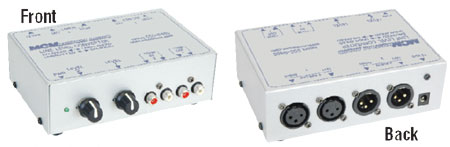
Another alternative to the included AM1000pr audio interface, it is possible to
use the MCM electronics 555-8485 as an unbalanced to balanced interface, let us
know and we will provide the connectors/wiring you need to use this device at
only a slight cost increase ($25). We also stock this device.
Click here
for AM processing article
Click here to see how to
connect the Innovonics 222.
Important: If you are using an Inovonics 222 or other processor capable of
driving the AM1000 beyond 100% positive peaks be sure to get the polarity of the
output balanced audio right, otherwise the processor will be trying to drive the
peaks negative which will result in distortion.
Customers report that there are surplus units like the CBS Volumemax available
that will produce great results with our unit.
Here is how to tell if your polarity is right:
1. Turn the positive peaks all the way down.
2. Turn the output level up until you get distortion, then back off a little
(hair) for good sound.
3. Then turn the positive peaks all the way up, if you get distortion then the
(output) terminals + and - are probably reversed.
The polarity of the input terminals doesn’t matter.
Audio Processing:
The Innovonics 222, 235, Optimod, and other radio station type audio processors
are different from a standard audio processor intended for general audio
applications. A standard audio processor like a Autocom Pro MDX 1400 can add
compression and limiting can improve your sound, but it can’t approach the what
a audio processor designed to drive a AM transmitter can do. The reason is an
old AM trick developed in the late 70’s called asymmetrical modulation. A big
word, but all that means is that instead of the wave form being balanced, or
equal around the ground, it is more positive. The waveform is not symmetrical,
it is asymmetrical. This has the effect of making your sound louder (punch
trough static) and makes it possible to modulate the transmitter to a higher
peak power legally. If you can find an Audiomax or Volumnmax am transmitter type
audio processor it can work well for you, they were popular in the 70's and
80's.
We are
offering a new HiFi option, here are some specs:
A
standard Rangemanster will be pretty flat at the higher freq up to 20KHZ
Pretty flat down to 100HZ.
Below
100Hz the response drops linearly about -3DB when it gets down To 20 HZ. Not
bad, that is about half voltage loss.
But
this can be made up in audio processing.
Note
that some Rangemasters have been shipped with some HiFi parts in The past
already. In just part of the board, not a full HiFi upgrade as I am doing
now.
Some
parts are only now available (or I have just found them).
The low
freq respose will be better onthese boards These board have a yellow
transformer as the small transformer, not blue.
Blue is
the standard.
The
large transformer is the modulation transformer and has always been red. The
new HiFi modulation Transformer is white.
The new
parts:
Using
the new parts instead of a 3 Db los on the way down from 100HZ To 20 Hz the
loss would be about half or 1.5DB I believe that is about a 18% voltage loss
At 10
Hz the loss is 1.2 Db, about
14%
voltage loss.
Note
that these measurement were made here in my shop with a scope and are not
certified.
RangeMaster is the only certified AM transmitter capable of asymmetrical
modulation.
Single chip audio processors found in real estate type transmitters don't offer
much performance, you are much better off with at least an Autocom Pro audio
processor or equivalent.
See this
document to set your modulation level with a scope.
See
www.radioassociates.com for
an inexpensive modulation monitor, (will monitor your radio waveform output) the
unit can work with Part 15 transmitters.
Ground Loops:
The audio interface provided with the RangeMaster contains a powered +/-
adjustable 6DB audio amplifier. While the output of the device is isolated, the
input is grounded thru a resistor. If you are experiencing hum, you may have a
ground loop here (or elsewhere).
The resistor (this resistor can be shorted by a switch, see adapter
instructions) between the grounds of the audio interface should prevent any
ground loop, but if not Ground loop isolators are easy to find. Radio shack has
one. Cheaper units can be found on
Amazon.com
Just do a search on "ground loop isolator" and many choices will come up.
Hum:
Another way to remove hum are to use a grounded power supply (you can get one at
Radio Shack) A grounded supply will have a third ground prong on the power cord.
The transmitter can operate with a supply rated .5 AMP in the 12-18 volt
DC range though it is better to use a supply above 14 volts. Be sure to ground
your shielded cable at one end only, don't run the audio cable near any AC power
cords.
Good grounding means connecting all grounds together at one point instead of
multiple paths.
A hum is either induced into the audio wiring by nearby AC power cords (move or
shield the audio wire), or from improper grounding, or can come in from the
power supply (use a shielded grounded supply).
A proper ground system will bring all grounding for all components to one point,
then at that point take the connection to the earth. Hum can come from ground
not really being true ground, but some potential above ground.
Radio station DJ software for the PC:
See
http://www.zararadio.com for a great program scheduler system. (free)
Also see
http://www.otsav.com/ (not free)
We have heard that Sam Broadcaster is good software.
There are many ways to put audio on your station, depending in your goals. From
a radio DJ scheduling software, to as simple as a $20 MP3 stick player.
The iPod shuffle is a great choice for your MP3 player audio source, just load
your MP3 files, and set it to repeat. Be sure to buy the "on the go" power
supply with it, you can get 110v AC or 12VDC adapters.(Amazon)
The audio spec for the RangeMaster is +/- 3db 20-20Kz which is typical for a
high performance unit, this can be increased even further with our hi-fi option
(call, see contacts) This spec can be improved to +/_ 2db
See
this link
for a high performance unbalanced to balanced link that could replaced our
AM1000PR adapter for high performance applications.
http://premtech.com/usb1100.html Premier
Technologies has an easy to use high quality MP3 player designed for the "music
on hold, store music" industry.
New! RangeMaster is now a dealer for the quality Premier Digital player Line
USB 1100 – The only available Premier unit that downloads MP3 files directly
from a USB flash drive (thumb drive) for Music on Hold
• Downloads standard MP3 files directly from the removable USB
drive to the internal memory or:
• Plays standard MP3 files directly from the removable USB
drive
• No special software needed to record new audio on the drive
• USB drive comes loaded with 6 licensed audio tracks
• Easy install for the smallest of locations
• Aluminum casing with external wall mounts
• Price is $249 with a 256 MB drive
For
information sheet click here
We have tested this unit here and it works great! Balanced audio out can drive
the transmitter directly or the 8 ohm out can drive the studio interface, your
choice.
Racom Inc make an unique easy to use
recorder/player, we can ship your RangeMaster with a Racom product if you like.
We will do all the interconnect wiring to the Racom product. They offer many
different models, see the link above, visit the Racom web site. Pick one you
like and call us for your pricing.